


Emoji Battery & Shimeji Pet
4.2316.00 Reviews
App Specs
- Version
- 1.0.7
- Updated On
- License
- Free
- Downloads
- 1,000,000+
- Developer
- Tools for Everyday - AI Tasks
- Categories
- Personalization
- Platform
- Android
Screenshots

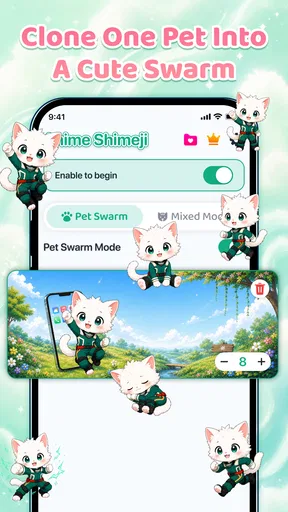
 Analysis by AppCompare
Emoji Battery & Shimeji Pet is best understood as a small visual makeover for your phone, not a deep customization suite. Its appeal is the combination of a character that can sit on the screen and a battery indicator with an emoji-style look. I’d recommend it to someone who enjoys playful details and wants their phone to feel a little more personal; I would not choose it for precise control over every part of a home screen.
A playful idea with a specific purpose
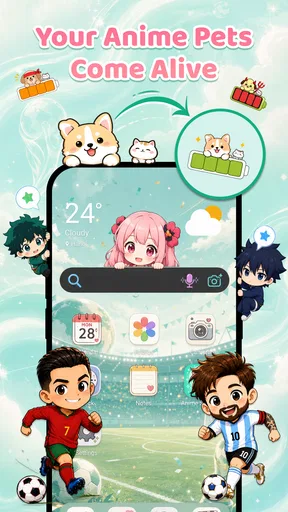
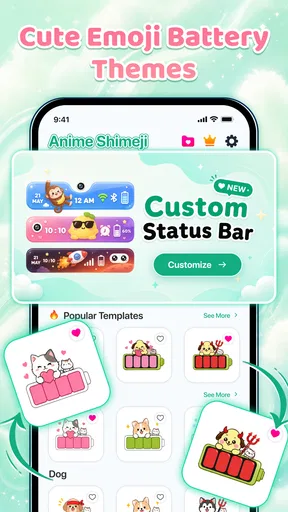
This is a free personalization app from Tools for Everyday - AI Tasks. Rather than focusing on wallpapers or icon packs alone, it brings together two decorative ideas: a Shimeji screen pet and a custom emoji battery icon. That pairing gives it a distinct identity, but it also means the app is aimed at people who like visible, lighthearted touches rather than a restrained or minimalist interface.
The central question for me is whether those touches fit into everyday phone use without becoming visual clutter. A screen pet can make an otherwise ordinary home screen feel more lively, while an emoji battery can replace a plain status detail with something more expressive. Neither changes what the phone can do, and that is precisely the point: this is about personality, not productivity.
Its audience is broad: the app is rated for Everyone, and it is listed with a 4.2 average from around 67,000 ratings. That level of interest suggests the idea has found an audience, though popularity alone cannot tell you whether its style will suit your own screen. I’d judge it by whether you enjoy seeing decorative characters and emoji details throughout the day.
What makes the combination work
The two elements serve different moods. The battery icon is a small, recurring detail; a screen pet is more of a playful presence. Used together, they can make a phone feel deliberately customized without requiring a complete redesign. If you already have a favorite wallpaper or launcher setup, this approach may be more appealing than replacing everything just to get a different look.
There is also a useful distinction between decoration that you notice once and decoration that you keep encountering. A wallpaper sets the scene, but a battery indicator appears as part of routine checking, and a screen pet is meant to be seen while using the phone. That repeated visibility is a strength if you enjoy the theme, but it is also why personal taste matters more here than a long list of features.
For a practical test, I’d start with the battery treatment before adding a character. The battery display is the less prominent choice, so it gives you a chance to see whether the app’s visual style feels right without committing your screen to a busier look. If you like that result, adding a pet can make the overall setup feel more cohesive; if not, you have learned something without overdecorating your home screen.
Worth Reading Before You Choose

Baby Panda World Brings Quick Play to Modern Phones, but Its Game Library Feels Busy

ESPN’s Live Game View Makes Following Close Games Easier

QuizzLand Review: A Good Fit for Short Trivia Breaks, Not Every Player

Basketball Stars: Multiplayer Is Fast, but Can It Recover When Matches Go Wrong?

WEBTOON Turns Phone Updates Into a Better Reading Routine

Link to Windows Runs on Shared Habits, Not Social Feeds
Where it fits among personalization options
Compared with a wallpaper app, this one is more interactive in spirit: its identity is tied to a screen pet, not just a static background. Compared with a full launcher or icon-pack setup, it is a narrower choice. Those alternatives can reshape the broader appearance of a phone, while Emoji Battery & Shimeji Pet focuses on a couple of recognizable details.
That narrower scope can be a benefit. A launcher may involve more decisions about layout and icons, while a simple decorative layer is easier to approach if you only want a touch of fun. But anyone who wants consistent control over every icon, widget, and screen arrangement may find a dedicated launcher more suitable. I would not treat this app as a replacement for a full theming workflow.
The key trade-off is visual character versus restraint. A pet and emoji styling are naturally more noticeable than a neutral battery symbol. If you share your phone screen often, use a clean work-focused layout, or dislike animated-looking decoration, the concept may feel distracting rather than charming. If you enjoy customizing your device for your own amusement, the same boldness is the attraction.
Small choices that help avoid clutter
One non-obvious way to approach a screen pet is to think of it as part of the composition, not as an extra decoration to add everywhere. A wallpaper with busy artwork already competes for attention, so a pet may look better against a simpler background. The practical tip is to change one visual element at a time and check the screen in normal use, rather than judging the setup only while actively customizing it.
The same principle applies to the emoji battery. It is a tiny interface detail, but it is placed where you may check it repeatedly. Choose a look you can read at a glance, not merely one that seems amusing in a preview. If the emoji treatment draws your eyes away from the battery information, a standard display is the more useful option. Decoration should make the phone feel yours without making a routine check less clear.
A second useful workflow is to treat the app as a theme accent rather than the foundation of your setup. Keep your existing wallpaper and layout, then see whether the pet and battery styling complement them. This avoids the common customization trap of changing several things at once and then not knowing which one made the screen feel too busy.
It is also worth deciding how often you want to see the character. A screen pet is not like a wallpaper that fades into the background; its presence is part of the experience. If you want a playful phone only for personal use, that can be a strong fit. If you prefer a screen that stays visually quiet during meetings or while showing something to another person, a subtler customization choice will probably age better.
The limits I would keep in mind
The biggest limitation is the app’s focused scope. It combines two decorative ideas, but that does not make it a comprehensive personalization toolkit. People looking for broad theme controls, extensive layout editing, or a subdued professional aesthetic should compare it with options built around those needs instead of expecting this app to cover them.
There is a second consideration: decorative features are most satisfying when they feel coherent with the rest of the phone. A pet that clashes with a wallpaper or an emoji battery style that feels too loud can make the screen look less polished, even if each element is appealing on its own. That means the user has to do some curation. The app’s concept is easy to understand, but the result still depends on restraint and taste.
Cost is another point to consider before settling in. The app is free to install, with in-app purchases ranging from $2.99 to $19.99 per item. I’d try the free experience first and decide whether the visual changes are something I genuinely want to keep using before paying for anything. The listed version is 1.0.7, and the minimum operating-system requirement is 8.0, so it is worth checking that your device meets that baseline before planning a setup around it.
It is also a relatively focused choice for someone who wants utility above all else. If the main reason you check your battery is to get information quickly, a conventional indicator may be easier to read and less distracting. If your priority is character and a more cheerful screen, the custom treatment makes more sense. Neither preference is wrong; the important thing is knowing which one matters more to you before installing.
Who is likely to enjoy it
I think the strongest fit is someone who likes customizing a phone in small, visible ways: people who enjoy cute characters, emoji aesthetics, or a home screen that feels less generic. It could also suit someone who wants a playful personal setup without rebuilding the entire interface. The app has reached over one million installs, but the right choice still comes down to whether its particular style matches yours.
Consider an everyday scenario: you check your phone between classes or during a break, glance at the battery, and see a little character on the screen. If that small moment makes your device feel more fun, this app’s combination has a clear purpose. If you mostly want a clean work tool and tend to remove visual extras, the same elements may become something you ignore or switch away from.
I would steer away from it if you want a carefully coordinated, understated theme or if you expect one app to redesign the whole phone. A wallpaper-focused app is a better fit for someone who only wants a new background; a launcher or icon pack is better for someone seeking broader visual control. This app makes more sense when the specific charm of a screen pet and emoji battery is what you are after.
My verdict on the experience
The best reason to try it is that it gives a phone two distinct decorative accents without asking you to commit to a complete redesign. That makes Emoji Battery & Shimeji Pet approachable for casual customization, and the combination is more memorable than a battery-style app on its own. The trade-off is that its appeal depends heavily on personal taste, and its focused purpose will not satisfy people seeking deeper theme control.
The developer, Tools for Everyday - AI Tasks, has placed it in the personalization space, and that is exactly how I would evaluate it: as an optional visual layer, not an essential utility. Since the app is free to start, I’d install it if you enjoy playful phone styling, test the battery treatment with your existing screen, and add the pet only if the result still feels comfortable during ordinary use. The 4.2 average is encouraging context, but your own tolerance for a more animated, expressive look is the better guide.
Overall, I’d recommend it to people who want a cute, noticeable twist on their screen and are happy to curate the result themselves. I’d skip it if you prefer clean status indicators, subtle themes, or whole-device customization. For the right person, it can add a little character to routine phone checks; for everyone else, a simpler personalization option will likely feel more natural.
Pros
- Cute shimeji characters add personality to your screen.
- Battery status is easy to check at a glance.
- Customization helps match the display to your style.
- Pet animations make the screen feel more lively.
- The app offers a fun alternative to plain battery indicators.
Cons
- Frequent animations may distract during phone use.
- Extra screen effects can use additional battery power.
- Some characters or features may require payment.
- Compatibility may vary across Android devices.
- Overlay permissions may raise privacy concerns.
FAQs for Emoji Battery & Shimeji Pet
What does Emoji Battery & Shimeji Pet do?
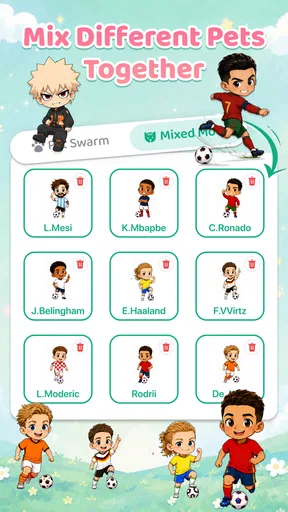
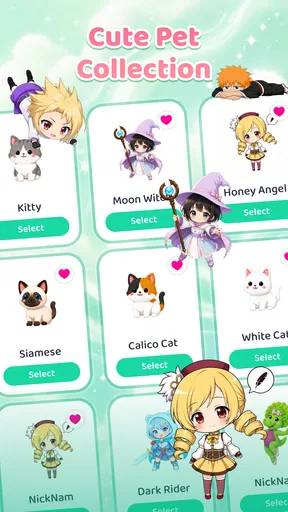
Emoji Battery & Shimeji Pet combines a battery display with a small animated character, often called a shimeji, that appears on your screen. Depending on the version and device settings, it may let you choose character styles, emojis, or battery themes. The character is primarily a decorative companion; it does not improve battery capacity or make your phone charge faster.
Does Emoji Battery & Shimeji Pet drain battery or affect phone performance?
Any app that keeps animated content visible or uses background services can consume some battery and memory, although the impact varies with the device, animation settings, and how often the app runs. If you notice extra power use, try disabling animations or overlays, limiting background activity, or uninstalling the app. Battery figures shown by the app should be treated as visual information, not a precision diagnostic.
What permissions does Emoji Battery & Shimeji Pet need, and is it safe to use?
The permissions requested can vary by app version and operating system. A floating character may require permission to display over other apps, while notifications or other features may request additional access. Review each permission prompt and the app’s store privacy information before granting access. Avoid enabling permissions that do not seem necessary for the features you want, and download only from an official app store.
How do I customize or remove the shimeji character?
Look in the app’s settings for options to select a character, change its appearance, adjust animation, or turn the overlay off. The exact controls depend on the version and the Android or iOS features supported by your device. If the character remains visible, reopen the app and disable its display or revoke any overlay permission in system settings. Uninstalling the app is another way to remove it.
Is Emoji Battery & Shimeji Pet free, and does it work on both Android and iOS?
Availability, pricing, and features can differ by country, device, and app version. Some editions may be free to install but include advertisements, optional purchases, or limits on customization. Screen-overlay and battery-display features also depend on what the operating system permits, so Android and iOS experiences may not be identical. Check the listing for your device before downloading to confirm compatibility and any costs.


